Showing posts with label Step by step. Show all posts

Tutoriel: how to prototype with a breadboard

Prototyping is not always an easy task with guitar pedals. One solution is to heavily mod an existing pedal. But what if you want to start from scratch? How to test things before designing a circuit and solder everything?

Well, we have a simple solution for that: using a breadboard!
DIY guitar effect breadboard

Let's go! In this blog post, we'll see why the breadboard is such a cool tool and how you can use it to design and test your own circuits.


How to build your first DIY guitar pedal (step by step tutorial)

You have never made a guitar pedal before? You are a bit lost and do not know where to start?

Here is the perfect place! I decided to write a full tutorial for beginners, to build an Earthquaker Device Acapulco Gold, step by step. No excuse not to get started!

The Acapulco Gold is a simple, yet very fun pedal to play with, and is perfect for beginners. The circuit is simple and easy to mod as well. With this tutorial, you should be able to build your first guitar pedal!

If everything goes well, you should get a guitar pedal like this in the end:

Your first DIY guitar pedal

Modding the Behringer UV300 Vibrato : tutorial

Here is my last ""build", I modded a Behringer UV300 vibrato:
Modded Behringer UV300

Behringer released a whole series of pedals inspired by not-produced-anymore Boss pedals like the Hyper Fuzz FZ2 (Behringer Super Fuzz 300), the Heavy Metal HM2 (Behringer Heavy Metal 300)...etc. I was really interested in one of them: the Behringer Ultra Vibrato, which tries to emulate the famous Boss VB2.

Eagle for making guitar pedals PCB: getting started (part 1/3)

Sometimes, especially with complicated builds with a lot of components, or when you have to build several times the same pedal, it is easier to use a printed circuit board (PCB) than veroboard or turrets board. A PCB is easier to assemble, and it prevents from doing many mistakes that can occur when using veroboard: false contacts, misplaced component, complicated wiring involving a lot of wires...etc.

"Eagle" is the name of a beautiful animal, but it also stands for "Easily Applicable Graphical Layout Editor", the name of a famous software that helps you to conceive and make printed circuit boards (PCB). I already used it a lot to make PCBs. For instance, I made a few Klon buffer boards with it. I decided to write a serie of articles explaining how to use it to make PCB for your guitar pedals.

2026 Update: Autodesk has announced End of Life for Eagle for June 2026. This is super disappointing, but Eagle seems to be no longer relevant for the guitar pedal community. Alternative is to switch to KiCad, which I will dive into this year. In the meantime, I have saved the popular Gauss Markov library in Eagle XML format and KiCad format (symbols and footprints) on GitHub.


Article parts:
  • Getting started (you are reading this one now)
  • Tracing the circuit (to be published)
  •  Creating the PCB layout (to be published)

EAGLE for DIY pedals
Become free to make PCB like you want with Eagle

Relay Bypass: conception and relay bypass code

You might already have heard about "relay bypass", or even used it without knowing it. It a different true-bypass system than the classical 3PDT switch. Instead of using a mechanical 3PDT switch, a soft switch, a microcontroller and a relay are combined to turn the effect on and off.

Relay bypass PCB DIY

 So... Why bother? My 3PDT switch is great, don't you think?

How to make patch cables: step by step tutorial

Patch cables are expensive most of the time; making them yourself can save you a lot of money! Most of the times, high-end boutique patch cables do not have any datasheet or what so ever to really know their characteristics. By making patch cables yourself, you can choose whatever cable and plugs you want. Moreover, you can make it as long (or as short) as you need, and not be embarrassed with a too long cable. Here is a tutorial about how to make guitar patch cables for your pedalboard.

I would also suggest to make your guitar cables yourself! Here is a step by step tutorial.


What do you need?

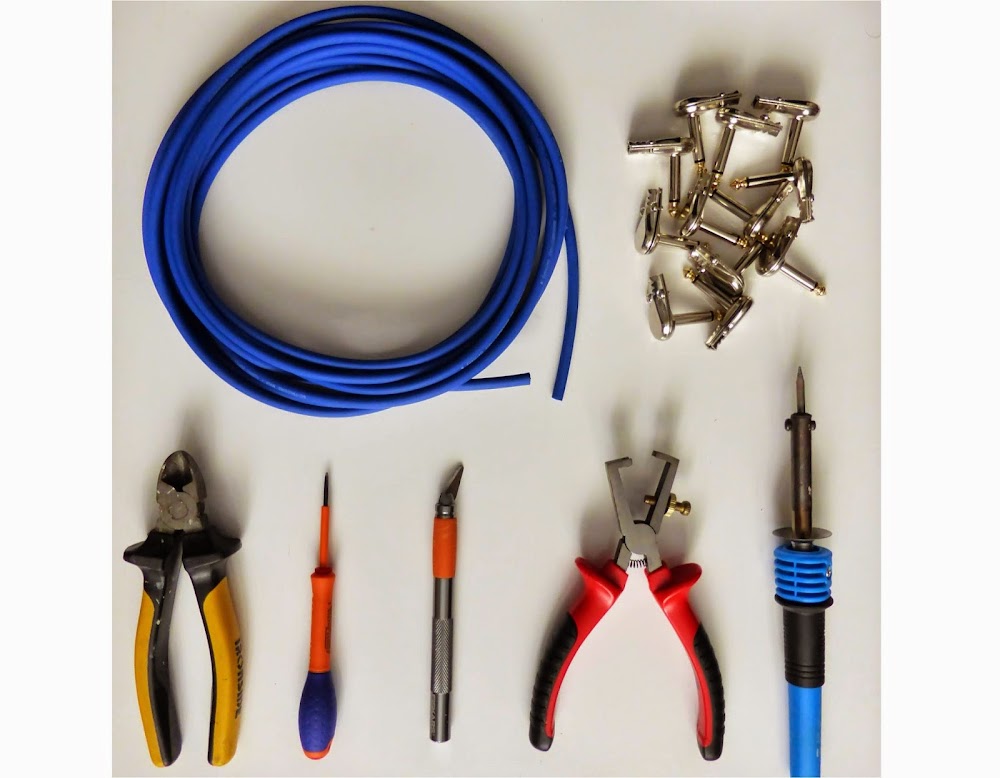
You will not need a lot of materials to make good patch cables. First, cable of course! I used Sommer Tricone MK2, mainly because it is highly flexible. Capacitance of the cable does not matter because I am using a buffer at the beginning of my chain. To choose the good cable, read my post about guitar cables.

I used a standard cheap pancake plug that I found on Banzai Music. You can find cheap ones on ebay too. Beware that some of these pancakes are not functional, sometimes the tip and the ground sleeves are connected without any reason (2 upon 26 connectors for my Banzai music ones)... So buy a bit more that you actually need, and check them before soldering!

Finally, you will need some classical tools: a cutter, pliers, screwdriver, a wire stripper and of course a soldering iron and solder!

how to make patch cables guitar

How to make guitar cables step by step tutorial

Making your own cables is really a good idea, mainly because it is easy and will save you a lot of money! High end cables can be very expensive. Moreover, most of the times, there are no datasheets provided for these expensive cables (with at least the capacitance per meter, or the type of cable that is used to make them, because most manufacturers do not make the cable wires themselves). So for me, it would be better to make it yourself so you can control everything,and not pay the extra money of a luxury type of brand.

To lear more about guitar cables, to know what makes a guitar cable good or bad, read my article: all you ever wanted to know about guitar cables, but were afraid to ask.

The guitar lead cable is the most important cable of your chain. This is the cable that goes from your guitar to your effects / straight to your amp if you are this kind of guitar player. If your guitar has no buffer in it (or no active pickups), which is highly probable as you are a conservative / vintage lover guitarist like me, the impedance of your signal will be high. You can loose trebles if the capacitance of this cable is too important (see my guitar cables: myths and legends article), before going through a buffer. Thus, if you which to keep it, you should have a short and low capacitance per meter cable.

If you want to make patch guitar cables, I also wrote a step by step tutorial about how to make patches for your pedal board.


What do you need?

For the cable itself, you have different options. The capacitance between the core cable that transmit the signal and the ground wire is the most important value that determine the treble loss. I would suggest to take a look at this table that sums up the capacitance per meter of many brands and types of guitar cables. Another thing to keep in mind is that this cable will go through a lot of gigs, concert, will be plugged / unplugged a lot of times, so it has to be rugged! The best for me is the Sommer LLX which has a super low capacitance per meter value, and is highly resistant. It is really made for guitar lead cable applications. Another option could be the Sommer Spirit XXL or the tricone XXL (they have the same capacitance per meter value, and the XXL stands for the fact that they are rugged). The cable must not be too long, so for me 1.5 to 3 meters is a good length. So to sum up, the cable should be rugged, short and with a low capacitance per meter.

The connectors have to be also of good quality, because this cable will go through a lot of use. The connectors should be tough. The Amphenol ACP M-GN is a classic plug that will perfectly fit this function. Neutrik NP2C is also a nice option. Remember: you do not need gold plated contacts.
Then, you will need a soldering iron, solder of course, pliers, a cutter (razor blades can do the trick too) and a wire stripper.

how to build instrument cable

Ditto Looper repair (how to fix a broken switch)

The Ditto looper from TC Electronics is a good looper - in theory-. Easy to use, no audio quality loss due to the high sample rate of the recorded signal, true bypass... Everything to make it the best looper for guitarists!

However, practically speaking, it has downsides: no stop button, which makes loops hard to synchronize, and it is really fragile! Mine did stop working after 6 months of intensive use (I bought it used so I guess it makes more than 6 months total). LED is still working, but I have to press many many many times on the switch before anything happens. Impossible to record loops! It was thus really useless as is.

First, I contacted TC Electronics customer service, and I have to say that they were not helpful. I bought my Ditto used, so I did not have any invoice. However, when the problem happened, it was less than 1 year and a half that the Ditto was issued, and it was guaranteed for 2 years!TC electronics did not agreed and suggested me an exchange, which more expensive than buying a new Ditto in a shop... Thanks TC!

It was try or die then: I tried to repair it!
Here is the step by step guide if you ever need to repair yours.
The main problem seemed to be the switch, which just needed replacement. I dismounted the pedal. First, you need to remove the knob by pulling it with pliers, and unscrew the potentiometer. Then unscrew the backplate. You have to separate the 2 circuit boards that are in the pedal. Indeed, to gain space, the Ditto is composed of two PCB, linked by connectors, allowing to fit such a complex system in a small enclosure (1590A size!). You have to pull up gently the top part of the circuit, holding the jack connectors. Then, you have two screws to remove to be able to pull the top part of the PCB. You should have something like this :
Ditto looper repairing

Electro Harmonix Soul Food diodes mod (step by step)

So I decided to mod my EHX Soul Food. As you may know, the Soul Food is a pedal "heavily inspired" by the famous Klon Centaur. The Klon is a rare overdrive pedal, which sells around 1500 euros today! This stompbox, created by Bill Finnegan in the 90s, is an overdrive with 3 controls: gain, volume and treble. It has been used and abused by many guitarists, including some famous ones like Jeff Beck. The Centaur is also known for its good quality buffer, like the Pete Cornish pedals. Thus, the Soul food is a cheaper version of the Klon.

However, when looking closer to the pedal, we can see that the diodes ("essential" says Bill Finnegan on the PCB of the new version of the centaur, the KTR) are not the same as in the Klon. Indeed, the klon centaur's diodes are germanium, whereas the Soul Food uses Schottky silicon diodes! The diodes are hidden on the top part of the PCB, in order not to scare the klon maniacs I guess. Diodes are indeed essential to generate saturation generally speaking, and germanium and silicium diodes have different properties, so changing it seemed a good idea.
Klon KTR diodes