People say that I worship the Univox Superfuzz a bit too much, but they are wrong. If I could, I would already have started a sect about this pedal!
It is simply my favorite pedal of all times! First because of its amazingly cool look with the huge "Super Fuzz" rubber pad, and also for its sound that is crazy loud and heavy. Seriously, best-fuzz-out-there!
After seeing Fu Manchu live in March, I could not resist buying one. After selling a kidney on the black market, I was quite lucky because I found a non-working unit on ebay that I could repair by replacing a few electrolytic capacitors.
The Super Fuzz is really the ultimate fuzz for me, so I decided to honor it by writing the most complete article about it. Here is the first part!
If you step on it, it hurts! Just kidding, it seriously works like Legos as well! 😃
You have to choose different bricks (the electronic components: resistors, capacitors, diodes, IC...) and to assemble all of them following a schematic.
The only problem is: like there are different colors for the lego bricks, electronic components are declined in various versions, with the same value.
For instance, many many different capacitors can be found with the same capacitance value: Panasonic SMF, Wima MKP2, FKP2, MKT standard... What a mess! Lets try to make order in all of this, and to see which capacitors are best suited for our use (guitar pedals).
The 6 elements of capacitors
There are globally 6 main types of capacitors: electrolytic, ceramic, film, tantalum, polystyrene and silver-mica capacitors.
The type of the capacitor is simply a description of what it is made of.
You should also look up for the capacitor working voltage (more on that in a bit). The tolerance of a capacitor is the maximum difference between a capacitor theoritical value and its real value. You should always look for that too; some capacitors can have tolerance values as huge as 40%! The smaller the tolerance, the better. 😊
Here are a few examples of through-hole capacitors. From left to right: 150pF ceramic capacitor, 1uF tantalum capacitor, 10nF Panasonic SMF film capacitor, 10uF Panasonic FC electrolytic capacitor and a 0.33uF Wima MKP2 film capacitor.
Lets start:
Electrolytic capacitors: they are cylindric. They usually have high capacitance value, so I would advise to use this kind of capacitors for any value above 1uF. They also are polarised most of the time, so beware with the orientation. A good model which I use a lot is the Panasonic FC serie: top quality and a nice black and gold look!
Ceramic capacitors: they are used for small capacitance value, around 10-500pF. They are not very appreciated by audiophiles, because they do not let pass some bass frequencies: they work as a high pass filter at 100Hz. If you make your guitar signal goes through this kind of capacitor without any alternate solution (another capacitor in parallel for instance), you will loose bass. However, when placed at strategic points of the circuit, they are very practical to choose how many trebles you want to go through. Usually, they have a high tolerance, so I recommand to look after models with a low tolerance.
Film-mica capacitors: they are used for low values like pF like ceramics. They are better than the ceramics, however, they are much bigger and more expensive. I would advise you to stay with the ceramics and save money!
Tantalum capacitors: drop-shaped capacitors, used for values around uF. They are not very good for audio, and quite expensive. The only advantage compared to other capacitors of the same values (electrolytics, film caps) is the space saving. Sometimes, their defects in audio can be useful to create a harsh sound good for some kind of dirty fuzz like big muff (for instance, the black arts toneworks pharaoh fuzz uses tantalum capacitors)
My 2 cents about tantalum capacitors:
Tantalum capacitors are great because they are so small, so they are use in many electronics devices like your phone or computer. However, they are many ethical problems with coltan (the mineral used to make tantalum) mining, with human rights violations. More infos here. I try not to use tantalum caps because of that.
Film capacitors: our favorites! Their value is in a large range from nF to 1 uF. You will use this kind of capacitors a lot! Moreover, most of them are really good for audio applications: MKP2 from Wima are a reference in the audio world. Panasonic SMF ECQ are also great, and have an easier-to-work-with shape with long lugs. Finallys, MKT standards are also quite good, and cheaper.
Here is a table to know which capacitor to use:
Value
Capacitor type
Examples
10-1000pF
Ceramic, Silver-Mica
Vishay ceramic caps, military grade ones are nice too
1nF-1uF
Film
Wima MKP2, MKS2, Panasonic SMF
1uF and more
Electrolytic
Panasonic FC
Except when indicated of course.
What about the working voltage?
The working voltage is the maximum voltage a capacitor can accept.
If you go above this voltage, your capacitor can be damaged! It is thus very important to use a tolerance which fits our usage.
In guitar pedal, we rarely use a voltage above 18V. So any capacitor with a tolerance above 18V is good.
Generally speaking, the bigger the tolerance value, the better.
Beware! With bigger working voltage also comes a bigger capacitor size. Electrolytic capacitors in particular can be HUGE! So always check the capacitor size as well.
Examples of capacitors in commercial pedals
Lets review a few pedals that some of you migh already have on your pedalboard! I will show you the guts of a few commercial pedals, and you will see what kind of capacitors they use.
Mojo Hand Iron Bell (Big Muff inspired fuzz):
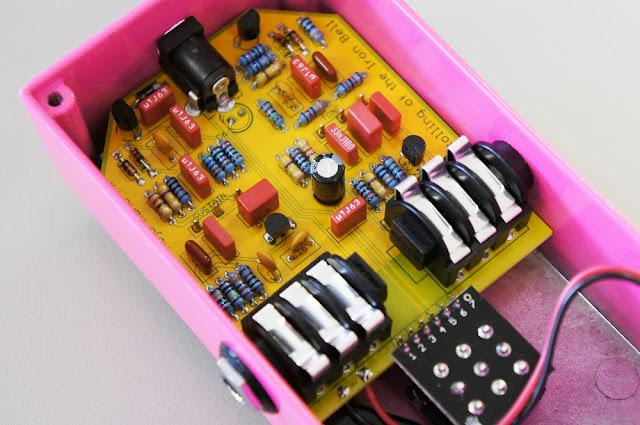
Here, we can find ceramic capacitors (small yellowish ones) and Wima capacitors that are film capacitors as well (red squares). There are also Panasonic SMF (dark red capacitors). Very good capacitors overall! No surprises from this very good brand.
Fulltone OCD (overdrive / distortion)
Here, we can see lots of ceramic capacitors (blue "drops" everywhere on the circuit, and brownish round caps), and 2 electrolytic capacitors (black cylinders on the top of the circuit).
Bearfoot Pale Green compressor
Finally, in this Bearfoot pedal, we can see one tantalum capacitor (orange drop on the left of the circuit), MKT capacitors, probably Epcos brand (blue boxes), electrolytic capacitors of different sizes (small and big black and white cylinders). Good stuff here too!
You have never made a guitar pedal before? You are a bit lost and do not know where to start?
Here is the perfect place! I decided to write a full tutorial for beginners, to build an Earthquaker Device Acapulco Gold, step by step. No excuse not to get started!
The Acapulco Gold is a simple, yet very fun pedal to play with, and is perfect for beginners. The circuit is simple and easy to mod as well. With this tutorial, you should be able to build your first guitar pedal!
If everything goes well, you should get a guitar pedal like this in the end:
Ready to make your first guitar pedal? Let's get started!
2026 Update: This guide has been fully revised! All links to components and tools have been updated to ensure you have access to the best current resources for your first build.
To make guitar pedals, you will need a few tools. Chances are that you already have few of them if you already are a bit of a handyman.
I suggest to get them on Amazon. I recommend not to buy your tools in online electronics store for guitar pedals because they usually sell low quality tools.
It is a bit of an investment, but it is really useful in the end. Have a look in your local electronics store. It is also a good idea to buy them used for cheap.
Let's review them.
A soldering iron. It should be 30W minimum. If not, you will have some hard times to get proper solders. Here is a basic one and a "deluxe" one if you plan on building many pedals. (the Weller soldering iron is a professional grade tool)
A drill. We will use it to drill the enclosures. Any one will do the job; enclosures are made in soft aluminum metal, which is really easy to drill. During a long time I used a cheap $15 one!
A step-drill or drill bits set. You will need the following diameters: . This step drill bits package is nice.
A round file. Some holes to drill have an unusual diameter. The DC jack is 13mm wide for instance. I use a file to enlarge some dill holes, because drilling with a 13mm is quite hard. A simple one like this is perfect.
This is the minimum requirement tools. With all of this you should be perfectly OK to make your first guitar pedal!
I recommend to order most of the parts at smallbear-electronics.mybigcommerce.com, an Brooklyn based American supplier. They have everything we need! Here is my favorite choice of components:
I recommend to order all the parts at musikding.de, a german supplier. They are very fast in shipping and prices are good. Here is my favorite choice of components:
It should cost you around $50 in total. If you want to go for others suppliers, you can read more on my guitar suppliers blog post. If you have any suggestions of other suppliers for other regions, do not hesitate to tell me in the comments.
If this is your first guitar pedal, I would strongly advise you NOT to use veroboard. Indeed, veroboard is often a cause for non-working pedals. It is really easy to misplace components or to have short circuits. Moreover it requires lots of offboard wiring which can be very confusing.
For my build, I will use my PCB. It is of very high quality with gold plated pads (makes the soldering process easier), components are well spaced to make soldering easier. You can find it here:
The PCB connects all the components togeter. If you look closely, you can see the tracks that connects the pads together.
The pads are golden because they are covered with a fine layer of gold. It is not to have the ultimate swag PCB (even if it does look so 😎), but because it prevents oxydization, has a very good conductivity and makes soldering easier!
Populating the PCB
Here is what you should have on your table now:
(the 10k resistor for the LED is missing on the picture)
Lets start to solder! Turn on your soldering iron and let's go!
Resistors
First, lets start with resistors. To solder them, bent their legs and place them on the PCB.
Name
Value
R1
1M
R2
68k
R3
22k
Beware: take your time! It is hard to dessolder components, you'd better not make a mistake.
To make a good solder, follow these steps:
Clean the tip of your soldering iron with a wet sponge. The sponge should be humid but not completely drawning in water (it will damage the tip of your soldering iron!)
Tin the tip of your soldering iron with a bit of solder
Heat the pad of the PCB and the leg of the resistor at the same time.
Once hot, apply a bit of solder. Apply just enough to cover the pad, not more! Try not to theat the components for too long!
Your solder should be shiny and should cover all the pad of the PCB, like this:
You did it? Cool!
The liquid that is released when you melt the solder is called "flux" and it is perfectly normal! Flux makes the solder flow easier.
If you have difficulties to melt the solder or you find it "sticky" and have a hard time soldering, it might be that your soldering iron is not powerful enough, or that you bought the wrong solder! Check that your iron is 30W minimum and that the solder your bought is 60% Sn.
Now your PCB should look like this:
Diode
Diodes have one particularity: unlike resistors, they have a polarity! Pay attention to this when soldering the 1n4001 diode D1.
Beware! Diodes are polarized components and have to be soldered in the good way! A white band shows their positive sides (on large signal diodes) or a black one for small signal diodes. Here is a small diagram:
So make no mistake!
There you go! Here is how should look your PCB now:
Sockets
We are going to use socket to avoid soldering the LM386-N1. Integrated Circuits (IC) can be a bit fragile and do not like to be heaten for too long.
Beware: you can know the polarity of the component by looking at its notch. Sometimes, there is no notch but a dot like this:
Do not put the IC in the socket yet! We will insert it at the end of the soldering, to avoid any overheating of the IC.
Here is your PCB now:
Capacitors
Let's solder capacitors now. There are six capacitors on the board. Five of them are electrolytic capacitors and C4 is a film capacitor..
Name
Value
C1
10uF
C2
10uF
C3
1uF
C4
4.7nF
C5
1uF
C6
47uF
Start with C4, it is a bit smaller than the other and will be easier to solder. C4 is a fim capacitor and has no polarity.
Once you are done with it, you can solder the electrolytic capacitors
Beware!
Electrolytic capacitors are polarized components like the diodes and have to be soldered in the good way! There are several indications to find their polarity:
If you invert the polarity, sound will not go through so make no mistakes!
Now your PCB should look like this:
We are almost done!
Check for one last time that your soldering is perfect (no contact between solders, nice shiny solders...):
Potentiometers
Last components to solder are the potentiometers. Let's start with the main potentiometer located on the board, which is a volume pot.
First, remove the tab of the potentiometers with pliers:
Remember that it has to be soldered on the other side of the board. First, cover the squared pad with solder:
Then, place the potentiometer, and heat it to place it correctly:
Finally, turn the PCB and add solder to every pad of the potentiometer. Put enough solder to cover the whole pad!
Finally, we have to solder the gain pot. Let's prepare it before soldering it to the PCB in the enclosure. To do that, prepare 2 wires:
Cut a good lenght of wire (more is better than less!)
Strip it on each side
Solder one side of it to the potentiometer like this:
Solder the two right lugs of the potentiometer like this:
Once it is done, we are ready to drill!
Drilling the enclosure
If you want to customize your enclosure, now it is time! If this is your first pedal, I would suggest to keep it like this for now.
To drill the enclosure, we first need to print a template. The template will help us not to make a mistake when drilling. It is fairly easy to mess things up when drilling... The enclosure is quite expensive so let's take it slowly!
Once you have print the template, cut it, and tape it on the enclosure. It should fit quite well like this:
Once you have done that, use a nail or anything to mark the emplacement of the holes to drill. Do not drill the center potentiometer as we are making the 2 knobs version.
Finally, remove the paper and check that you can see where to drill. You should be able to see the spot let by the nail:
Usually I use a step drill to make things easier. Here are the diameters for each holes:
Potentiometers: 8mm (0.325")
DC jack: 13mm (0.512") - drill a 12 mm hole and then enlarge it progressively with the round file. Check that the DC jack fit or not during the process to avoid drilling a hole too big!
Input and output jacks: 10mm (0.393")
3PDT: 12mm (0.472")
Led bezel : depends on the model you chose. Generally, the diameter to drill is indicated on the sales page.
Let's go! Take your time and go slowly. Aluminum is easy to drill so no big deal here! Your enclosure should end-up like this:
Perfect! Now we are ready for the last part!
Wiring the circuit
This is the part where beginners often make mistakes! Take your time and check everything.
We have now to connect everything together. First, put everything in the enclosure: PCB, gain potentiometer, input and output jack... It should look like this:
Now, we have to connect everything using wire. Here is a schematic of what we want to achieve:
To do that, estimate the length needed for your wire, cut it (with a comfortable margin), and strip the ends of it with a wire striper.
Let´s start with the small wire of the 3PDT. Make a small wire like this:
Then, place it in the 3PDT and solder it:
In a general way, I would recommend to prepare the wire and place it before soldering anything.
Now, lets prepare the grounding. Ground is the reference 0V voltage. If you do not connect all grounds together, your circuit will probably not work or be very, very noisy. On the PCB, ground is indicated as GND. The jack inputs and the DC jack also have a ground connection.
Here is the jack connections. The negative sleeve is the ground connection, and the positive sleeve will transmit guitar signal.
Cut the wires and dispose them in the enclosure like this:
Then solder it. Apply a lot of solder on the jack inputs. You want to fill the hole where the wires are inserted.
Now, lets go for the DC jack. Here is its polarity:
Connect the 9V to the 9V pad on the top of the PCB, and do the same for the ground.
Follow the schematic above and connect everything. Take your time!
Here are a few tips for the LED. You see that we have to connect a resistor between the 3PDT and the LED. The best way to do that is to prepare the resistor and start by soldering it on the LED.
Bend the 10k resistor like this:
You can now solder it on the minus side of the LED. Pay attention on the polarity of LED!
An easy way to remember it is that the minus side leg is "minus" long than the positive side leg, which is "plus" long. Not sure if it is very English though! 😅
Once you have solder it on the LED led, cut the other leg of the resistor to the appropriate length and place it in the 3PDT. Finally, solder it. It should look like this:
Once you are done with the resistor, you can solder the 9V wire to the other side of the LED. Same technique as above, first twist the wire:
Place it on the positive side of the LED and solder it:
Place the other side of the wire in the 9V pad on the bottom of the PCB and you are done!
You know how to wire now, you can do the rest by yourself. Just follow this schematic:
More tips about guitar effects wiring on this blog post.
Once you have solder the jacks and the potentiometer, you are done!
Here is the inside of the final pedal, do not forget to place the ICs in there, following the right polarity:
You can now test it on your favorite amp!
What to do if your pedal does not work
Benoit! My pedal makes no noise at all 😥
Do not panick!
I like to say that electronics never work on first attempt. Even after building more than hundred pedals, I still make mistakes and some of my pedals do not work right after soldering!
First, check that your wiring is correct. It is the part where beginners makes most mistakes.
If your wiring is OK, just follow this list:
Did you inverted input and output jack? (more common than you think!)
Did you made a mistake in the wiring?
Did you make a mistake with one component? (pro tip: do not forget to put the ICs in the sockets 😁 )
Re-check the wiring!
If you still have not find the issue, get some rest! Sometimes, we cannot see obvious things because we are tired. After a good night of sleep, I discovered so many stupid mistakes in some builds! You can read my blog post about debugging guitar effects before going to bed.
Circuit analysis: how does it work?
OK this thing is cool sounding and all.... But Benoit, how does it work?
Let's dive in.
The circuit is organized around the two integrated circuits LM386N-1 (IC1 and IC2, the two triangles on the schematic below). What happens here is very representative of what happens in a lot of guitar pedals.
Have you ever tried to push the sound of a device too loud? For
instance, if you set your laptop volume to 200% (possible on VLC), with
volume maxed out, you will hear that your sound is not really good
sounding at higher levels: it is distorded! That is exactly what happen in this little stompbox.
In electric guitar, that is exactly what we do when we add saturation to
our sound. However, we try to make saturation sound as musical as possible (and
that is why we still use tubes: the way they saturate is really
musical).
Depending on the electronic component used, the way it distort will be very different:
Germanium transistors have a reputation to distort nicely, whereas silicon ones can sound a bit harsh (which can be nice in some fuzz circuits)
OP amps can distort very differently depending on their internal architecture.
... but tubes are still the golden standard for distortion. It is so musical that they even like its distortion in the HiFi world!
Saturation happens when the devices we use (amp or pedals) tries to amplifies at a level which is simply impossible. The top of your guitar signal can't be amplified, which will generate distortion.
The term "gain" just mean how much the signal will be amplified. A gain of two means that the volume will be doubled.
A first OP amp will amplify your signal a lot, so much that it is impossible for it to amplify it.Indeed, in the Acapulco Gold, the first OP amp have a gain factor of 200, meaning the OP amp tries to make your guitar signal 200 times louder!
Here, it is the LM386N-1 that saturates and create this massive sound. That is why the volume increase is also so crazy. In the end, you sound is still amplified by a huge gain factor!
So now that you got the general idea, let's go in the details. First, lets divide the circuit in several parts:
Power Supply Filter
This part of the circuit just aims at resolving two things: polarity inversions and noise.
If there is a polarity inversion, the diode 1n4001 will let current pass and prevent it from going into the circuit.
It is very common for power supplies to have residual ripples of 50Hz from your power outlet in the 9V DC provided to your gear, that can generate noise in your circuit. The C6 capacitor will absorb excess of current provided by the power supply, and provide a bit more current when the power supply lacks a bit of voltage.
Input Stage
This stage goal is to amplify the guitar signal in an extreme way to make it saturate.
The C1 capacitor is a coupling capacitor. Coupling capacitors are used to prevent any parasitic DC current to go into the circuit. Indeed, capacitors only let alternate current go through them. The bigger the value of coupling caps, the more bass they will also let through. 10uF is a huge value for a capacitor, meaning all the bass content of your guitar will be amplified too.
If you find your pedal too bassy, it is also an easy way to decrease bass content: replace the coupling caps by lower values like 22-47nF.
R1 is called a pulldown resistor, and is used to increase input impedance of the circuit. It also helps to prevent "pop" noise when you activate the pedal (which is very common with high gain circuits like this one).
Then your signal will go though the first operational amplifier, from pin 3 (input) to pin 5 (output).
C3 is another coupling cap with a big value to let aaaalll the bass go in the next stage.
Filter
The problem when you amplify a signal is that you amplify all the frequencies, including the ear-piercing treble content of your telecaster guitar. 😭
This stage reduces the treble content of your amplified signal with a simple RC filter to prevent that.
R2 and C4 form what is called a low pass filter. It will prevent high frequencies to go through the next step of the circuit. They are very common in guitar pedals to adjust the tone of an effect.
You can calculate the cutoff frequency by a simple calculation:
Here, the cutoff frequency of this filter is
f = 1/(2 x π x 68 000 x 4.7 x 10-9)
f ≈ 498 Hz
498 Hz is a fairly low cutoff frequency, meaning few trebles will go through this filter. It gives to the pedal is heavy, bassy feeling, and avoid having too much trebles in the final sound.
Changing R2 by a lower value allows to have more trebles. You can also replace it by a 100k potentiometer to have a tone control!
Output stage
The output stage re-amplies a bit the signal and is used to set the final volume
The IC2 OP amp have a gain factor of 20. The signal is again amplified. C5 is a coupling capacitor again.
Here, R3 is a 22k resistor, which represent a small volume reduction. If you find that the pedal is too loud, you can increase its value to have a more usable volume output.
Finally, the "GAIN" potentiometer is used to adjust the volume (confusing, I know). When you turn the potentiometer, its resistance value changes and thus changes the amplitude value of the output signal. Read my post about potentiometers for more about it.
There you go! I hope that you now have a working pedal and that you understood how it works!